Monday, May 10, 2010

Handling duplicate Area/Controller names in ASP.NET MVC 2

When dealing with duplicate names for an "Area" and "Controller" in ASP.NET MVC, we could run into issues. The ASP.NET routing mechanism needs to be understood to produce the proper links. In this post, I will walk through the problem, and the fix for ASP.NET MVC 2 on Visual Studio 2010.

First create an ASP.NET MVC 2 application from File -> New -> Project, and choose the project type shown below.


Next create an "AdministrationController" and an associated folder, called "Administration" inside the "Views" folder. Also create an empty view page (Index.aspx) inside this folder.

Place the below text inside the Content2 section of this view page.

   1:   <h2>Administration in Root</h2>

Then create a link to this controller/view from the "Home/Index.aspx" file as shown below.

   1:   <%=Html.ActionLink("Administration in Root", "Index", "Administration") %>

Make sure the link works as supposed to.

Stop debugger, and add a new area by right clicking on the solution, selecting "Area". Give the Area as "Administration".
Create an "Administration" controller as in the application's root, but this time inside the "Administration" area. Create the associated view folder/index.aspx page.Place the following text in the content area.


   1:  <h2>Administration in Area</h2>


Run the application as before, and verify that "Administration in Root" this time fails with a message similar to below:


Add another link to the "Administration" area from the "Home/Index.aspx".


   1:  <%= Html.ActionLink("Adminstration in Area ", "Index", "Administration", new { area = "Administration" }, null)%>


This link now will work from the Home/Index.aspx page hitting the "Administration in Areas" as shown below:

Now we need to fix the "Administration" in the application's root path.
To do that, we add the "namespaces" optional parameter in the routes.MapRoute function as shown below.


   1:     routes.MapRoute(

   2:                  "Default", // Route name

   3:                  "{controller}/{action}/{id}", // URL with parameters

   4:                  new { controller = "Home", action = "Index", id = UrlParameter.Optional },  // Parameter defaults

   5:                  new string[]{"DuplicateAreaControllerName.Controllers"}

   6:              );


By adding namespace to the routes.MapRoute(...), the previous Html.ActionLink(..) to the application's root "Administration" screen will work as before. Ideally, you will not run into this, but my team had this problem while trying to develop a similar feature set inside the areas with the same name. Looks like ASP.NET MVC 1.0 does not have a direct solution, but ASP.NET MVC 2.0 has better built-in support, although not very obvious at first. Hopefully you will be careful with your naming and avoid such situations in the first place.

Monday, April 5, 2010

A tour around Open Data Protocol (OData)

It should come as no surprise that the amount of data collected in many places are hard to get to. Given the ubiquity of web technologies, the need for information from the silo’ed databases, file systems and static web sites are increasing more than ever. Google has already established its own GData and offering solutions. Representational State Transfer (REST) and the simplicity of web protocols are also driving these initiatives.

OpenDataProtocol

Microsoft recently rebranded its ADO.NET Data Services (formerly known as “Astoria”) to OData. I have been dabbling with the OData recently and it is quite impressive what is possible just from out-of-the-box. Then again I haven’t built a full-fledged application yet, but first looks are pretty decent.

OData comprises a bunch of well-established protocols helping the creation of HTTP-based data services. It enables access and exposure of variety of sources (database, file systems and web sites). For in depth look, please check out Odata.org

As of today, using Visual Studio 2010 RC, we can build applications and there are few blog posts out there. On VS 2010, start by creating a ASP.NET Web Application from File –> New –> Project, and choose ASP.NET Web Application (see below).

CreateNewSampleWebOData

Next add a new ADO.NET Entity Model for the project. Right-click project and say “Add –> New” and choose ADO.NET Entity Model.

ADONETEntityModel

Give it a proper name. In this example, I am going to use the Northwind database since it is pretty common for SQL Server and at one point, shipped with SQL Server. Now you can download it from here. Once you run the installer you need to attach the database files to your pertinent SQL Server instance.

The wizard will walk you through the Generation of EDMX file. First "Generate from database” option, then point to your SQL Server instance and pick Northwind database.

As shown below, I used “Categories” and “Products” tables for this.

GenerateDatabaseObjects

Now pay attention to your Model namespace, because this will impact your Web.config file. Subsequent attempts of doing the same steps will clutter your file, and you may end up with **Model1, **Model2 names in your configuration file. Click “Finish”. Now you have created a simple ADO.NET Entity model. It is time to expose it via WCF Data service.

In the same web project, add new WCF Web Service. Right-click on the project, and “Add –> New Item…” and choose “WCF Data Service” under “Web” tab. I am starting to like the VS2010’s organization of items, but sometimes things still don’t make sense, or “haven’t adjusted to it yet”.
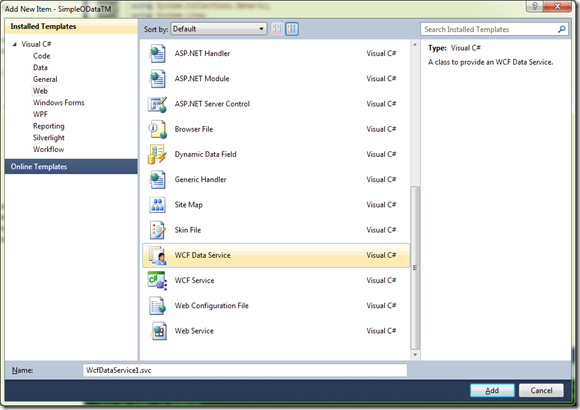
CreateNewWCFDataService

Once you have created the service, go ahead and open it up source editor. Notice the first line. Change it to say the name of your entities.

public class WcfDataService1 : DataService<NorthwindEntities>


Next, add the below two lines to indicate you are setting these access rules on these entities.


config.SetEntitySetAccessRule("Categories", EntitySetRights.All);
config.SetEntitySetAccessRule("Products", EntitySetRights.All);
…


Those two lines in place, you can check your work up-to now by simply setting the service as “Start page” and view the results in browser. (shown below for IE-8).
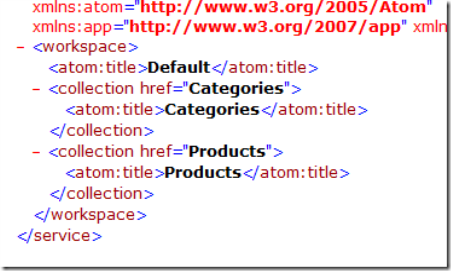


baseEntity


Finally to consume and query this service, we can create a simple console application and add it to this project. I wrote this simple function to display products on the query window (borrowed a few ideas from Scott Hanselman’s a much better and elegant “Creating an OData API for StackOverflow including XML and JSON in 30 minutes”. For in depth coverage, please check out his blog.


First we need to add a service reference, right click on the Console project and choose “Add Service Reference”. You have to copy and paste the web service URL you created in the previous step. Paste the address and hit “Discover”. Again pay attention to your name spaces.


TechMasterService


Again if you think this is too simplistic, you are not alone. At some point we have to worry about security/credentials and maybe performance, but not right now. But impressive what you can accomplish with a few mouse-clicks out of the box.


For VS-2010 RC, you can also download and install “Open Data Protocol Visualizer” from “Tools –> Extension Manager” menu item. Once that is place, it is pretty slick to see it in action.


Right click on the service name from the Solution Explorer and choose “View in Diagram” option. This will open up a nice canvas for object visualization. Notice the new tab called “Open Data Model Browser” . Very nice I thought. You can drop your entities and look at your columns, etc.
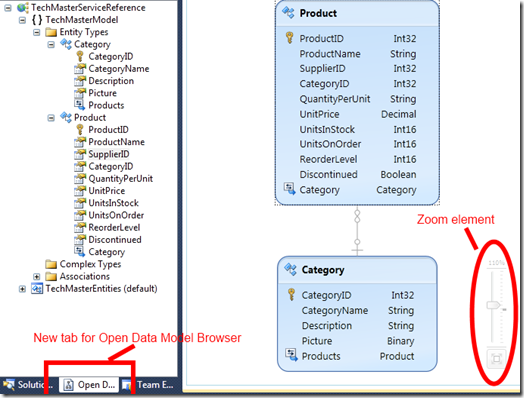


OpenDataModelBrowser


Finally to query referenced entity model, I added below to the start-up of this console application.


   1:  class Program

   2:     {

   3:         static void Main(string[] args)

   4:         {

   5:             CallingODataService();

   6:         }

   7:   

   8:         public static void CallingODataService()

   9:         {

  10:             var tm = new TechMasterEntities(

  11:                 new Uri(http://localhost:xxxx/TechMasterService.svc));

  12:   

  13:             var products = from p in tm.Products

  14:                            select p;

  15:   

  16:             foreach (Product p in products)

  17:             {

  18:                 Console.WriteLine(p.ProductName);

  19:             }

  20:   

  21:             Console.ReadLine();

  22:         }

  23:     }


Don’t forget to change your port number to your own as well as your service name. The partial results from the console are shown below.
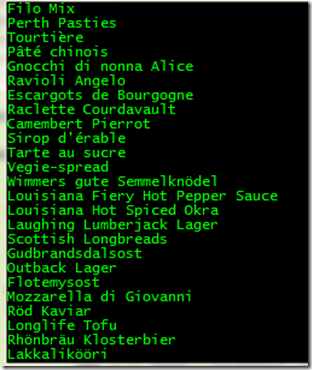
partialResults
That is pretty much it for now. Looking forward to finding more about oData protocols and exposing silo’ed data using HTTP protocol in secure and simple ways. Happy Coding!

Wednesday, December 9, 2009

Implementing Custom Security in ASP.NET MVC framework

Securing a web site and web page is the most critical task a developer has to accomplish and get it right. In ASP.NET MVC, we are presented with membership and role providers to achieve the security. We can also use authorization attributes and write our own to lock down controller actions.

Security can be broken down to two aspects. First one is authentication, which is validating you are who you say you are. This is typically done through a username and password against a common repository. Second one is authorization, which is you, as an authenticated user, are allowed/denied certain actions on a given website/webpage.

ASP.NET MVC framework allows custom membership (authentication piece) and role (authorization piece) providers. Although this is fine for most applications, creating/editing roles can require a recompile of the whole application and redeployment. To get around this, you can create another layer, let's call, Context (or Features) if you will, and associate each role with multiple features.

I have done a sample application, and published the CodePlex. You can find the link here

Let me know if/when you check it out and what you think about it. Thanks for reading and happy coding!

Baskin

Wednesday, September 30, 2009

Composition vs. Inheritance

Reusing existing code and avoiding code duplication lands itself to better, scalable and maintainable design and application architecture and is practiced by the Object-Oriented Programming (OOP) community. Inheritance is officially one of the three pillars of OOP, although composition isn't. The difference between the two is, inheritance depicts a "Is-A" relationship where composition is "Has-A" relationship.

As an example, let's take the object "book". I have a special type of book, called "technical book" which derives from the object "book". Certainly a technical book is a special type of book, but it is a book. Composition on the other hand is the having one object containing another object, hopefully related, but not necessarily. Check out the object of "Cover". The "book" has a "cover". Here is a C# code snippet.
   1:  public class TechnicalBook : Book
   2:  {
   3:    // every method & property of Book class (protected + public) 
   4:    // other methods and properties of TechnicalBook
   5:  }
   6:   
   7:  public class TechnicalBook
   8:  {
   9:     private technicalBookCover = new Cover();
  10:     
  11:     public string Title()
  12:     {
  13:        technicalBookCover.Title = "Design Patterns";
  14:        return technicalBookCover.Title;
  15:     } 
  16:  }
  17:   
  18:  public class Cover()
  19:  {
  20:     private string title;   
  21:   
  22:     public string Title { get return title; set title = value; }
  23:  }


Why is this important? Well, if we want to create applications which will be maintained over time and be used and extended in the future, I believe it is critical we make this distinction and model our applications accordingly.

My past experience had been more towards inheritance, but I resented the times that I have painted myself to a corner, since the dependencies created via inheritance becomes a burden to carry forward. Inheritance always exposes every public member in the base class while composition gives you an option to selectively choose, if any
By using Composition, the TechnicalBook class is insulated against changes of the inner class, Cover. With Inheritance any modifications to the base class Book, the TechnicalBook class is affected. If you want to bind the two classes, you can use an interface as a binding contract and let the two classes implement that interface.

In conclusion, Composition requires more work to expose the implementation of inner class objects, but the decoupling achieved by between the current type and the base type can quite valuable. Inheritance still holds true in cases where a clear "Is-A" relationship holds true, but in the long run things may need to be tweaked. And that's when you may want to favor Composition.

References:


Thursday, August 20, 2009

Why Change?

Pretty sure this happens to everyone. One day, some higher authority comes along and tells you that what you have been doing is not quite "right" anymore and there is a new way of doing things. Not only that, along the way, while you are in transition, even the new way is changed. What do you do? Do you change your ways of doing things?

This is how I perceive Microsoft's data access technology. Don't get me wrong - it is great to have choice and the future of data access is getting better (okay I am hopeful and I am not even blaming Al Gore on this one). I joined the data access technology evolution in middle 90's. Back then we have ODBC, OLE DB, and ADO. Programming with recordsets in ADO in VB 6 has always been cumbersome, but had my fun of coding. While Not rst.EOF .. Wend anyone?

Then early 2000's, started with .NET 1.0, quickly became 1.1 in 2002. We were introduced to ADO.NET. Between ADO and ADO.NET, there were a lot of changes (besides the addition of .NET). Old way of doing things was not recommended. Now we had datasets and datareader, and data adapters. The relational database is still there (and it will be there for awhile!), but how we shuffle the data between the application tiers was altered. Besides the data access, finally OOP became first class citizen in VB.NET. And that's when I switched to C#. I was getting too confused between VB-6 and VB.NET, but still I did application development in VB.NET. Besides it is really not too hard to program between the languages. It all comes down to Common Language Runtime (CLR. Not a big fan of language wars... just use the right tool for the right job. Maybe Ruby on Rails...

Meantime I delivered and worked with ADO.NET 2.0 projects along with ASP.NET. Things were working out okay, then around 2003, started hearing about eXtreme Programming (XP), writing tests first like Test Driven Development, then came Ajax. Was not quite getting it for awhile. But the best thing to learn a new technology is doing a project with it. Using NUnit framework, did a few applications I realized how easy and fun to write code and test it right there, without launching the debugger, using Asserts and such. And I changed once again and I don't ever want to go back to the old way, especially for enterprise applications. Like Michael Feathers tells you in his book "Working Effectively with Legacy Code", legacy code is code which does not have tests.

In 2005, I attended my first Professional Developers Conference in Los Angeles. The highlight of this conference was the announcement of Linq (stands for Language Integrated Query). Using this colorful, a little terse (at first) syntax, one can get intellisense code from the database. Thought it was very powerful and can't wait to use it. Just as ramping up with this Linq-to-SQL technology (by the way, it only worked with SQL Server), and I was supporting a few Oracle databases (I was using Oracle's .NET library and there is no Linq in that). Thus I did not get ramp up too far ahead.

Meantime around 2007, we heard another technology called ADO.NET Entity Framework. With EF, other databases besides SQL Server can also be accessed using entityclients and object contexts. It's not even done yet. After version 1.0, Microsoft is delivering EF v.4 (what? is that a typo? no, that's MS. they can do that, ver.2 & 3. are skipped) Here we go again...

My point is the change is going to happen, whether you like it or not. If you don't change, you take the risk of being obsolete. Be flexible and learn the new technologies. Master them as much as you can, but when it is time to jump and move on, do not resist and adapt as soon as you can. Software project delivery time-lines are usually set aggressively. How do you factor this in your project delivery timeline. Hmmm.. That may be another blog post.

Again the mantra is sometimes, the old technology is fine and it works, hopefully testable. Now do we want to change it? It works, right?. Is it worth changing it? Maybe. But I know I will be changing, hopefully for the better when it comes to data access.

References:
Working Effectively with Legacy Code

Monday, July 13, 2009

Working with Offshore

The increased efficiency of the online communications tools, offshore software development has become more prominent in the IT industry. Currently I am working with a bright off-shore development team located eight time zones away. There are some challenges, but overall things are moving well. In this blog, I would like to share my experiences and give a few tips, if I may.

Communication
Obviously not everyone speaks, writes and reads English as their first language. English is also my second language, but living in the States for over fifteen years, I seem to do well and even blog about it. Specifically with software development, getting one's point across is very essential when the team is not co-located. We use a few online, instant messaging and audio/video programs. Earlier we tried ooVoo, however the off-shore team found that it was CPU intensive (with all the ads and everything on the side which I am not too surprised), and they suggested we use Skype. So we switched. It works pretty well and adds to our daily email exchanges. Definitely pick an instant online communication tool which all the team uses

Within the team, our direct point of contact speaks the best English as expected, yet others are good in writing. There was one time that I called one of the developers and could not understand what he was saying, and he probably did not understand what I was saying either because he requested that I speak slowly. And yes, I could speak quite fast at times. Then I quickly switched to instant messaging. This allowed my offshore developer to think more over the text he reads, then respond. I don't plan on calling him directly anymore. Although a conversation is good thing, but it feels odd when the other party is not sure what is being said. Video definitely helps with sending the gestures and such. But in general it is good to keep things in writing.

Get to know your team
Haven't got the chance to meet the team in person, but initially I mentioned that I was going to visit their country and asked and requested for certain information. They were quite excited and eager to share the info and their culture. I inquired from one of the developers about his beer tastes and whether he drank it or not. Again myself being from overseas, which is not too far off from this location, exchanged a few other stories and got a little more personal. I think this really helps in creating a more friendly and understanding atmosphere.

Don't be a dictator
One of the lessons, no matter how smart you are (or think you are), hopefully learned is to cultivate a shared development environment. Recently the off-shore team went ahead without checking with us and completed major refactoring. That caught me off-guard, but there is a lesson in that. First, the project needed refactoring and I was reluctant to do that right away due to another pending major integration (back-end) process. But that was all right. We regrouped and just this morning we had a teleconference call and discussed our refactoring process where I think everyone got on the same page. I did answer a few follow-up clarification questions but everyone is on the same page.

Let them have time to ramp up and study
In this project we are using ASP.NET MVC framework. Early in the project, one of the developers decided to take the M (Model) from MVC of the web project into an outside class library project. After checking and figuring out the reasoning, we found out that it was not such a good idea since ASP.NET MVC dictates convention over configuration. Yet the idea is to let the team find out and try to improve the code through refactoring and remodeling. My advice to team was, okay, there is another way of doing, but prove that why that way is better and if it makes the most sense.

Respect gets respect
This goes without saying, but it is better to state it anyway. Just because you are supervising, there is no point in being arrogant or bullish when discussing issues with the team. Everyone has opinion and when time comes, it is best to discuss. Try to understand where the team is coming from and give them respect for their idea and creativity. There is always more than one of peeling the cat ;-)

Try to stay ahead of them
Okay, this is my current challenge right now. We added two additional developers and it is getting harder for me to stay ahead, but I will keep reviewing the code base and provide feedback as it fits. I also have the other integration project which is ramping up as well. Anyway that is what I got to do. But the point is, it is important to stay ahead of them and give them direction and try to anticipate the changes in business and requirements. The one thing that is certain is things are going to change. Be responsive and reactive to changes, hopefully proactive more.

There will be many more tasks for us to do in this project. We have an agressive timeline, but using agile methodologies, specifically Scrum really fitst the model. We modified the process a little to meet our needs but it is going through. Our business analysts are creating documentation everyday which the development team is consuming. The TDD approach is really getting up there. Just today we got notification that our initial code coverage setups and implementation are taking place. These are great signs of progress and will hopefully allow us to deliver this product on time and within budget. I am stoked to work with these bright guys and I am glad to mentor and learn from them as project moves forward. But understanding each others' culture, either onshore or offshore and working on the communication skills are essential to what we do which is creating functioning software applications for healthcare business.

References:


Wednesday, May 27, 2009

It Depends...

Wonder how many times you heard this as an answer to a specific question by an expert of the matter. Scratched your head about what it means and question their authority. Yes?And it is true in many respects too given the choices we have around our technologies. That is a good thing, right? Well, guess what... it depends...

Recently I have been tasked with creating a technical specification document for a given application module. I delivered the document knowing what I know at the time and tried to avoid Big Design Up Front (BDUF) anti-pattern. I have to admit there are quite a few holes in my document but my goal is to fill up them as I find more about the requirements and increase my understanding of the application. So far we have is a few screens of wire-frames, an initial functional specification document. The business analysts are hard at work in peeling those requirements and creating/modifying the functional specifications. It's all good in the end as long as we have a grasp on the amount of the documentation. And, yes, we are using an agile methodology and have daily scrum meetings and two week Sprints. We are staying focused.

Including myself, the team is very new to this company. What are some of the challenges? Well, lack of requirements one might say, but I am yet to be on a project where this isn't the case. The second that you think you nailed down the requirements, guess what happens. It changes! Head First Object Oriented Analysis and Design book had a good chapter for this, “You're perfect. Now change!” Exactly. So I am not too hung on this. Just get me enough to start coding...

There is some worry about the business process, and lack of decisions. We are also going to use an off-shore team as well to do some of the development and testing. I expect to be working closely with this team at some level. I have a few questions and concerns with that, but I will bring it as it moves forward. Keeping development cycles short, feed-back loops tight and close. Wire-frame developers griped a little about not seeing the whole picture, but sometimes you don't need to.

As far as technologies go, I am all about .NET development which is our platform. This is a web-based application with multiple tiers, heavy emphasis on separation of concerns, testable, decoupled layers. There will be WCF services used by the business tier as well as third parties. I am pushing ahead with ASP.NET MVC framework with business objects (logic) in the middle, and ADO.NET Entity Framework in the data access layer. We are going to use Test Driven Development, writing our tests first, thinking “unit testing”. I realize that TDD is not unit-testing, but I am already spreading the words/ideas about the functionalities to test. I really believe this will help us increasing our code-coverage numbers as well as CCHIT requirements fulfilled. My goal is when some one asks me how this works, I could just run a few unit/integration tests and show that they meet the requirements. Yes, got to have tests... there is no other way around that!

Meantime I plan to write quite a few throw-away proof of concept code to aid the actual coding. I plan to address the cross-cutting concerns, exception management, authorization, authentication, logging, caching (defer it until I have more hands on with application), encryption and security.

Our database is SQL Server with some interfaces to legacy DB2 databases, We do have an aggressive time-line, as with most development teams. We are definitely going to be busy. Well, if you are going to ask me how is it going? You will know my answer...

Happy Coding!